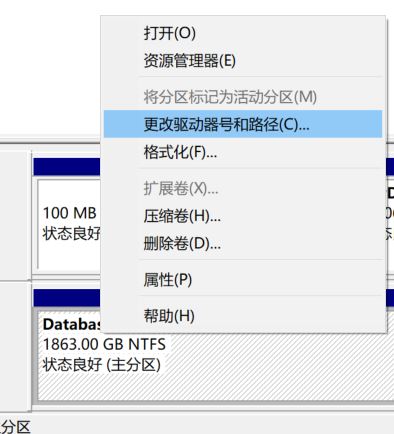
windows 盘符发生变化-原本的E盘变F盘 By 南瓜酥叔叔|2020-08-31T22:44:28+08:0018 8 月, 2020|小技巧|0 Comments 按windows +x 找到磁盘管理,右击想要改变的磁盘号 点击更改 选择想要的盘符即可。 赞过:赞 正在加载… Related Posts 如何去掉windows桌面右下角的激活版本号 Gallery 如何去掉windows桌面右下角的激活版本号 16 2 月, 2022 | 0 Comments 电脑磁盘丢失10G左右空间 电脑磁盘丢失10G左右空间 11 12 月, 2020 | 0 Comments windows 10系统下进行简体中文与繁体中文切换 windows 10系统下进行简体中文与繁体中文切换 16 8 月, 2020 | 0 Comments Leave A Comment 取消回复Comment Save my name, email, and website in this browser for the next time I comment. 通过邮件通知我后续评论 通过邮件通知我有新文章





Leave A Comment